KU.Campus
KU.Campus is the University's campus management system with which students can manage their course registrations and withdrawals on modules within degree programs. It allows students to register for courses and, in particular, to register or login for and to withdraw from exams. KU.Campus fully maps all degree programs offered by the KU, including all available modules assigned to the respective required and required elective areas, as well as any associated elective areas.
KU.Campus is used, in particular, for legally binding registration for end-of-semester exams as well as for registration or login to take exams held during the semester. In the degree program view, you will see the courses and exams currently offered listed under the modules.
Degree program and modules in KU.Campus: Module handbook
The degree program overview in KU.Campus serves as the electronic module handbook. You can access the module handbook in KU.Campus by selecting the “Degree Programs” tab in the left-hand menu bar. The module handbook contains all complete module descriptions for the degree program. The module titles in the program overview in KU.Campus are hyperlinks that lead to the complete module descriptions.
Once you have registered on the KU.Campus page using the “Login” button (top right) with your ID, you will find the “My course” section in the left-hand navigation bar.
Here, you must first make the necessary selection: If you are enrolled in multiple degree programs, you can choose between them here.
In the course catalog for your degree program, you will find all the modules in the program: Required and required elective areas, specializations (if applicable), etc., which you must or may complete in accordance with the Examination Regulations.
If there are several different versions of a module, the correct module version, the corresponding exam, and the course(s) offered for it will be displayed here.
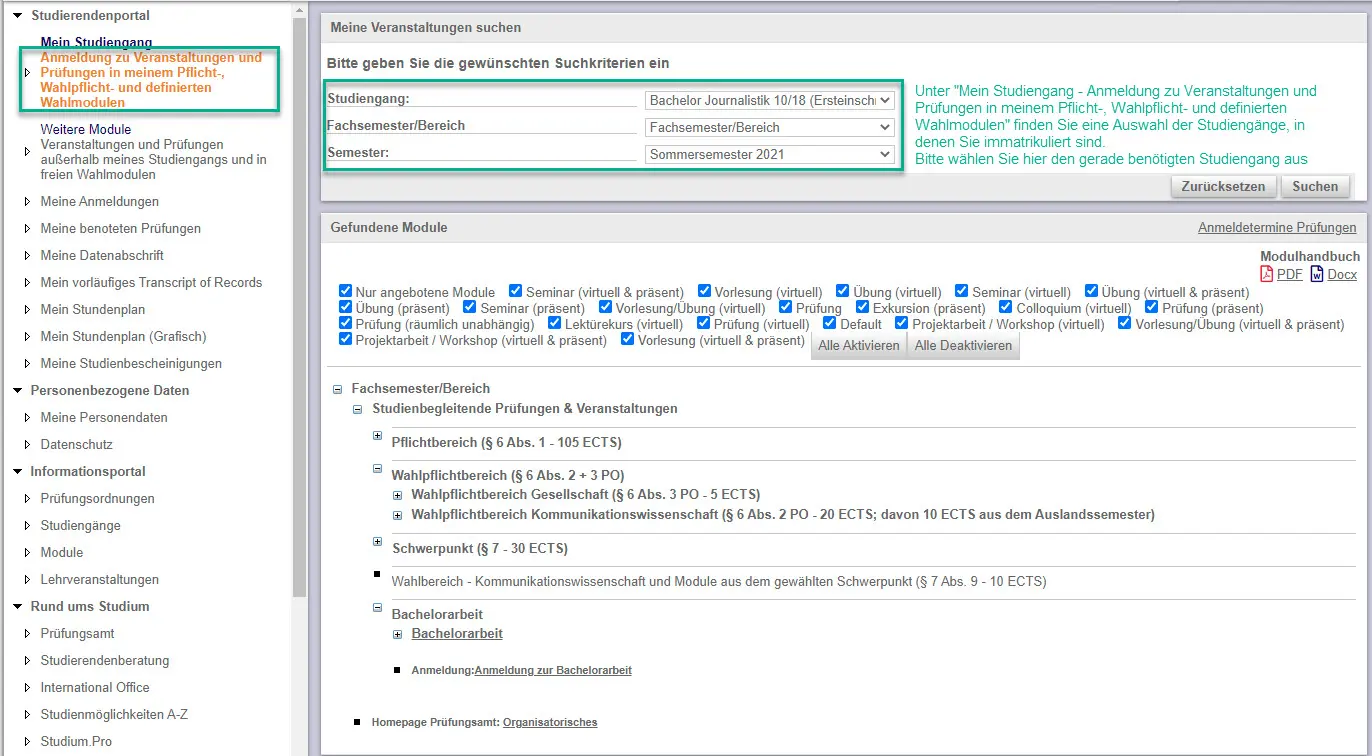
Registration for exams and courses in modules
Registration/login for lectures and exams related to required and required elective modules, specializations, defined elective modules, etc., is made on KU.Campus exclusively through the student portal (under the “My course” section). There you will find the correct required, required elective, and elective modules that you must complete in accordance with the (subject-specific) examination regulations or degree program description (required elective module catalog) applicable to you.
Registration for courses and exams for modules that are not listed in your own degree program and can be selected from free-choice areas (e.g., from the entire range of modules offered by the KU) is done in the Student Portal under the “Modules outside my degree program” section.
Difference in registration for courses vs. registration for exams
Students can register for the courses of their choice via KU.Campus. Registration for a course is legally independent of the exam requirements. Students register for courses via KU.Campus to create their own schedule and, for example, to gain access to related course content on the ILIAS learning platform. Several courses with different content may be offered for a single module, from which students can then choose.
If students wish to take the exam associated with the module, they must register/login for it in KU.Campus by a specific deadline. The module can only be recorded later as “passed” or with a grade if students have registered for the corresponding exam and have subsequently passed it.
Registering for the waiting list in KU.Campus
Generally, you can easily register for a course in KU.Campus, and the course will then appear immediately in your schedule.
There are some courses at the KU with limited enrollment. For such courses, you will usually put your name down on a waiting list.
To check the registration status of your course, please log in to KU.Campus. There, under “My Registrations,” you will see the status.
If it says “aA.Waiting List (Online)” under Status/Edit, you are on a waiting list.
How do I set up my timetable?
In KU.Campus, you can register for courses and also de-register. This allows you to create and keep your individual timetable up to date each semester, and from there, access detailed information about your courses – such as a link to access assigned course materials in ILIAS.
To create your schedule, you must first log in to KU.Campus and then select “My Course” from the menu in the upper left corner. In the main window, you will now see an overview of your entire degree program. There, you can register for courses for the current semester.
We recommend that you first register in KU.Campus for all the lectures you wish to take in the current semester. Next, register for all the seminars you have selected. Please note that some seminars are offered on different days and at different times; in these cases, you can choose the option that minimizes scheduling conflicts with other courses. In a third step, please then register for exercises, tutorials, and other optional and supplementary courses.
You can find an overview of all the courses you have selected in the menu at the bottom left under “My Timetable (graphical).” You can double-click on a course in the schedule to open detailed information.
We generally recommend that you plan your timetable according to the recommended ideal program structure, which you can find on your degree program’s website.
Cancelling your registration for a course
To cancel your registration for a course, please first log in to KU.Campus. In the menu on the left, select “My Registrations.” In the main window, you can then select the course for the relevant semester that you wish to de-register from. Click “Cancel Registration.” After that, the course will no longer appear in your individual schedule.
Confirmation e-mails from KU.Campus
When you register for a course or an exam in KU.Campus, you will usually receive a confirmation e-mail. For course registrations, there may be exceptions to this due to technical reasons.
KU.Campus can now process more registrations in a shorter amount of time. However, during the registration period for courses at the beginning of the semester, the volume of incoming registrations is often so high within just a few seconds that the KU.Campus e-mail system cannot keep up, and as a result, the system may only be able to send some confirmation e-mails partially.
You can, however, view all your registrations at any time under the “My Registrations” menu item in KU.Campus.
Dates for entering grades
There are deadlines for grade entry, which are listed in the schedules for exam registration and grade release published by the Examinations Office. If you have not received a grade by these deadlines, you may contact your examiner directly to let them know that you still need a grade.
Overview of Grades and Transcript of Records
If you need a transcript or overview of grades in PDF format, you can request one from the Examinations Office using the contact form, specifying your degree program and selecting the category “Overview of Grades.” Please indicate whether you need the transcript in German or, for example, in English for an application to study for a semester abroad.
Once processing is complete, your current overview of grades will be available on KU.Campus under the menu item “My Preliminary Transcript of Records.” Please note that the PDF overview of grades does not update automatically.
The overview of grades is an official document of the KU Eichstätt-Ingolstadt.
If your overview of grades does not include all the modules you have completed that you would like to count toward your elective area, please notify the Examinations Office using the contact form, specifying the module code of the missing module, your degree program, and selecting the “Overview of Grades” category.